# macOS Installers Abuse

<details>

<summary><strong>从零开始学习AWS黑客技术，成为专家</strong> <a href="https://training.hacktricks.xyz/courses/arte"><strong>htARTE（HackTricks AWS红队专家）</strong></a><strong>！</strong></summary>

支持HackTricks的其他方式：

* 如果您想看到您的**公司在HackTricks中做广告**或**下载PDF格式的HackTricks**，请查看[**订阅计划**](https://github.com/sponsors/carlospolop)!
* 获取[**官方PEASS & HackTricks周边产品**](https://peass.creator-spring.com)
* 探索[**PEASS家族**](https://opensea.io/collection/the-peass-family)，我们的独家[**NFTs**](https://opensea.io/collection/the-peass-family)
* **加入** 💬 [**Discord群组**](https://discord.gg/hRep4RUj7f) 或 [**电报群组**](https://t.me/peass) 或 **关注**我们的**Twitter** 🐦 [**@carlospolopm**](https://twitter.com/hacktricks_live)**。**
* 通过向[**HackTricks**](https://github.com/carlospolop/hacktricks)和[**HackTricks Cloud**](https://github.com/carlospolop/hacktricks-cloud) github仓库提交PR来分享您的黑客技巧。

</details>

## Pkg基本信息

macOS的**安装程序包**（也称为`.pkg`文件）是macOS用于**分发软件**的文件格式。这些文件就像一个**包含软件安装和运行所需的一切**的盒子。

安装程序包本身是一个存档，其中包含将安装在目标计算机上的**文件和目录层次结构**。它还可以包括**脚本**，用于在安装前后执行任务，如设置配置文件或清理旧版本的软件。

### 层次结构

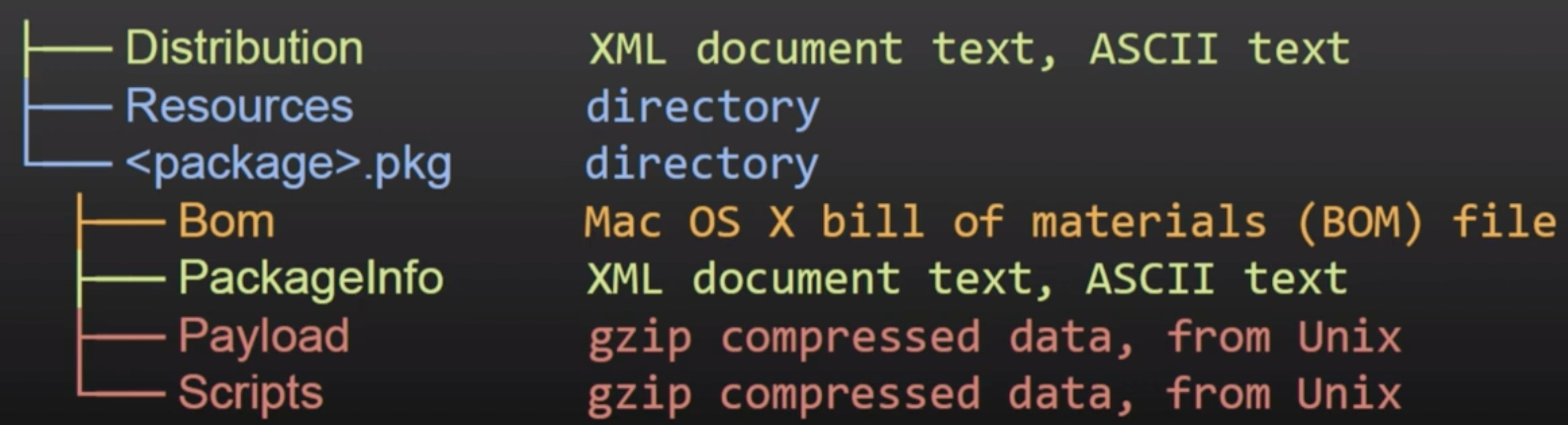
<figure><img src="/files/GSc1cPihAPor3AMESU2k" alt="https://www.youtube.com/watch?v=iASSG0_zobQ"><figcaption></figcaption></figure>

* **Distribution（xml）**：自定义内容（标题，欢迎文本...）和脚本/安装检查
* **PackageInfo（xml）**：信息，安装要求，安装位置，要运行的脚本路径
* **材料清单（bom）**：要安装、更新或删除的文件列表，带有文件权限
* **Payload（CPIO存档gzip压缩）**：要在PackageInfo中的`install-location`中安装的文件
* **脚本（CPIO存档gzip压缩）**：预安装和后安装脚本以及提取到临时目录以供执行的其他资源。

### 解压缩

```bash
# Tool to directly get the files inside a package
pkgutil —expand "/path/to/package.pkg" "/path/to/out/dir"

# Get the files ina. more manual way
mkdir -p "/path/to/out/dir"
cd "/path/to/out/dir"
xar -xf "/path/to/package.pkg"

# Decompress also the CPIO gzip compressed ones
cat Scripts | gzip -dc | cpio -i
cpio -i < Scripts
```

## DMG基本信息

DMG文件，或苹果磁盘映像，是苹果macOS用于磁盘映像的文件格式。DMG文件本质上是一个可挂载的磁盘映像（包含自己的文件系统），通常包含原始块数据，通常经过压缩并有时加密。当您打开一个DMG文件时，macOS会将其**挂载为物理磁盘**，从而允许您访问其内容。

{% hint style="danger" %}
请注意，**`.dmg`安装程序支持许多格式**，过去一些包含漏洞的安装程序被滥用以获取**内核代码执行**。
{% endhint %}

### 层次结构

<figure><img src="/files/6QBcIks4YVLAOD42vqII" alt=""><figcaption></figcaption></figure>

DMG文件的层次结构可以根据内容而异。但是，对于应用程序DMG，通常遵循以下结构：

* 顶层：这是磁盘映像的根。通常包含应用程序，可能还包含到应用程序文件夹的链接。
* 应用程序（.app）：这是实际的应用程序。在macOS中，应用程序通常是一个包，其中包含许多组成应用程序的单独文件和文件夹。
* 应用程序链接：这是指向macOS中应用程序文件夹的快捷方式。其目的是使您能够轻松安装应用程序。您可以将.app文件拖到此快捷方式以安装应用程序。

## 通过pkg滥用提权

### 从公共目录执行

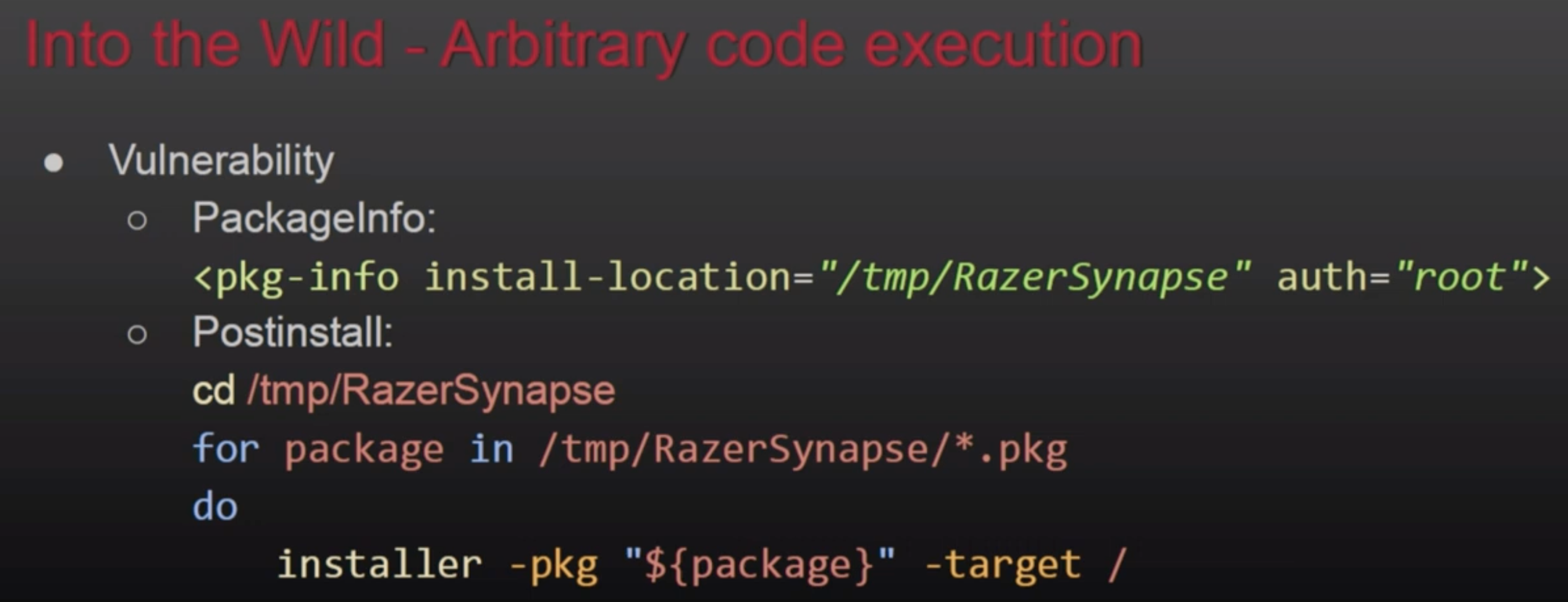
例如，如果预安装或后安装脚本从\*\*`/var/tmp/Installerutil`\*\*执行，并且攻击者可以控制该脚本，那么他可以在执行时提升权限。或者另一个类似的例子：

<figure><img src="/files/ir9aMyaLOQMSdzp6zNFR" alt="https://www.youtube.com/watch?v=iASSG0_zobQ"><figcaption><p><a href="https://www.youtube.com/watch?v=kCXhIYtODBg">https://www.youtube.com/watch?v=kCXhIYtODBg</a></p></figcaption></figure>

### AuthorizationExecuteWithPrivileges

这是一个[公共函数](https://developer.apple.com/documentation/security/1540038-authorizationexecutewithprivileg)，几个安装程序和更新程序将调用它以**以root身份执行某些操作**。此函数接受要**执行的文件的路径**作为参数，但是，如果攻击者可以**修改**此文件，他将能够**滥用**其以root身份执行以**提升权限**。

```bash
# Breakpoint in the function to check wich file is loaded
(lldb) b AuthorizationExecuteWithPrivileges
# You could also check FS events to find this missconfig
```

### 通过挂载执行

如果安装程序写入 `/tmp/fixedname/bla/bla`，就有可能在 `/tmp/fixedname` 上创建一个没有所有者的**挂载**，这样你就可以在安装过程中**修改任何文件**，以滥用安装过程。

一个例子是 **CVE-2021-26089**，成功**覆盖了一个周期性脚本**以获取 root 执行权限。欲了解更多信息，请查看演讲：[**OBTS v4.0: "Mount(ain) of Bugs" - Csaba Fitzl**](https://www.youtube.com/watch?v=jSYPazD4VcE)

## 将 pkg 当作恶意软件

### 空载荷

可以只生成一个带有**预安装和后安装脚本**但没有任何载荷的 **`.pkg`** 文件。

### Distribution xml 中的 JS

可以在软件包的 distribution xml 文件中添加 **`<script>`** 标签，该代码将被执行，并且可以使用 **`system.run`** 来**执行命令**：

<figure><img src="/files/E9dJeS1N8IQ4vURZPk2E" alt=""><figcaption></figcaption></figure>

## 参考资料

* [**DEF CON 27 - Unpacking Pkgs A Look Inside Macos Installer Packages And Common Security Flaws**](https://www.youtube.com/watch?v=iASSG0_zobQ)
* [**OBTS v4.0: "The Wild World of macOS Installers" - Tony Lambert**](https://www.youtube.com/watch?v=Eow5uNHtmIg)
* [**DEF CON 27 - Unpacking Pkgs A Look Inside MacOS Installer Packages**](https://www.youtube.com/watch?v=kCXhIYtODBg)


---

# Agent Instructions: Querying This Documentation

If you need additional information that is not directly available in this page, you can query the documentation dynamically by asking a question.

Perform an HTTP GET request on the current page URL with the `ask` query parameter:

```
GET https://hacktricks.xsx.tw/macos-hardening/macos-security-and-privilege-escalation/macos-files-folders-and-binaries/macos-installers-abuse.md?ask=<question>
```

The question should be specific, self-contained, and written in natural language.
The response will contain a direct answer to the question and relevant excerpts and sources from the documentation.

Use this mechanism when the answer is not explicitly present in the current page, you need clarification or additional context, or you want to retrieve related documentation sections.