> For the complete documentation index, see [llms.txt](https://hacktricks.xsx.tw/llms.txt). Markdown versions of documentation pages are available by appending `.md` to page URLs; this page is available as [Markdown](https://hacktricks.xsx.tw/network-services-pentesting/135-pentesting-msrpc.md).
# 135, 593 - Pentesting MSRPC
从零开始学习 AWS 黑客技术,成为专家 htARTE(HackTricks AWS 红队专家)!
支持 HackTricks 的其他方式:
* 如果您想看到您的**公司在 HackTricks 中做广告**或**下载 PDF 版的 HackTricks**,请查看[**订阅计划**](https://github.com/sponsors/carlospolop)!
* 获取[**官方 PEASS & HackTricks 商品**](https://peass.creator-spring.com)
* 探索[**PEASS 家族**](https://opensea.io/collection/the-peass-family),我们的独家[**NFTs**](https://opensea.io/collection/the-peass-family)
* **加入** 💬 [**Discord 群组**](https://discord.gg/hRep4RUj7f) 或 [**电报群组**](https://t.me/peass) 或在 **Twitter** 🐦 [**@carlospolopm**](https://twitter.com/hacktricks_live)\*\* 上\*\*关注我们。
* 通过向 [**HackTricks**](https://github.com/carlospolop/hacktricks) 和 [**HackTricks Cloud**](https://github.com/carlospolop/hacktricks-cloud) github 仓库提交 PR 来分享您的黑客技巧。
%20(3)%20(1).png?alt=media) 加入 [**HackenProof Discord**](https://discord.com/invite/N3FrSbmwdy) 服务器,与经验丰富的黑客和赏金猎人交流!
**黑客见解**\
参与深入探讨黑客的刺激和挑战的内容
**实时黑客新闻**\
通过实时新闻和见解及时了解快节奏的黑客世界
**最新公告**\
了解最新的赏金计划发布和重要平台更新
**加入我们的** [**Discord**](https://discord.com/invite/N3FrSbmwdy),立即与顶尖黑客合作!
## 基本信息
Microsoft 远程过程调用(MSRPC)协议是一个客户端-服务器模型,使程序能够从位于另一台计算机上的程序请求服务,而无需了解网络的具体细节。该协议最初源自开源软件,后来由 Microsoft 开发并拥有版权。
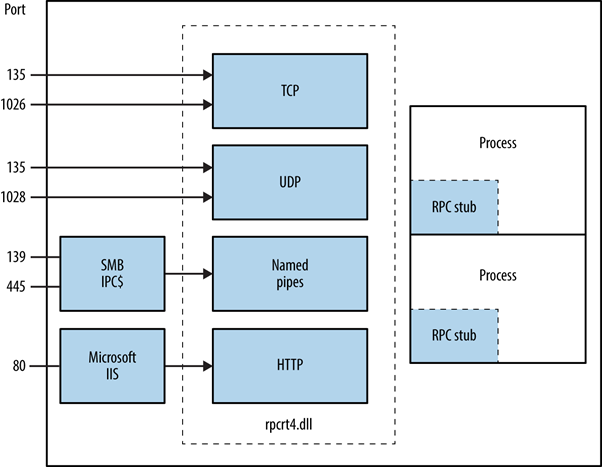
RPC 端点映射器可以通过 TCP 和 UDP 端口 135 访问,SMB 可以通过 TCP 139 和 445(使用空会话或经过身份验证的会话),以及作为 Web 服务在 TCP 端口 593 上。
```
135/tcp open msrpc Microsoft Windows RPC
```
## MSRPC工作原理
由客户端应用程序发起,MSRPC过程涉及调用本地存根过程,然后与客户端运行时库交互,准备并传输请求到服务器。这包括将参数转换为标准的网络数据表示格式。如果服务器是远程的,传输协议的选择由运行时库确定,确保RPC通过网络堆栈传递。
## **识别暴露的RPC服务**
通过查询RPC定位器服务和各个端点,可以确定RPC服务在TCP、UDP、HTTP和SMB上的暴露情况。诸如rpcdump之类的工具有助于识别独特的RPC服务,由**IFID**值表示,揭示服务详细信息和通信绑定:
```
D:\rpctools> rpcdump [-p port]
**IFID**: 5a7b91f8-ff00-11d0-a9b2-00c04fb6e6fc version 1.0
Annotation: Messenger Service
UUID: 00000000-0000-0000-0000-000000000000
Binding: ncadg_ip_udp:[1028]
```
访问RPC定位器服务通过特定协议启用:ncacn\_ip\_tcp 和 ncadg\_ip\_udp 用于通过端口 135 访问,ncacn\_np 用于 SMB 连接,ncacn\_http 用于基于 Web 的 RPC 通信。以下命令示例展示了利用 Metasploit 模块审计和与 MSRPC 服务交互,主要集中在端口 135:
```bash
use auxiliary/scanner/dcerpc/endpoint_mapper
use auxiliary/scanner/dcerpc/hidden
use auxiliary/scanner/dcerpc/management
use auxiliary/scanner/dcerpc/tcp_dcerpc_auditor
rpcdump.py -p 135
```
除了`tcp_dcerpc_auditor`之外,所有选项都是专门设计用于针对端口135上的MSRPC。
#### 显著的RPC接口
* **IFID**: 12345778-1234-abcd-ef00-0123456789ab
* **命名管道**: `\pipe\lsarpc`
* **描述**: LSA接口,用于枚举用户。
* **IFID**: 3919286a-b10c-11d0-9ba8-00c04fd92ef5
* **命名管道**: `\pipe\lsarpc`
* **描述**: LSA目录服务(DS)接口,用于枚举域和信任关系。
* **IFID**: 12345778-1234-abcd-ef00-0123456789ac
* **命名管道**: `\pipe\samr`
* **描述**: LSA SAMR接口,用于访问公共SAM数据库元素(例如用户名)并无视账户锁定策略暴力破解用户密码。
* **IFID**: 1ff70682-0a51-30e8-076d-740be8cee98b
* **命名管道**: `\pipe\atsvc`
* **描述**: 任务计划程序,用于远程执行命令。
* **IFID**: 338cd001-2244-31f1-aaaa-900038001003
* **命名管道**: `\pipe\winreg`
* **描述**: 远程注册表服务,用于访问和修改系统注册表。
* **IFID**: 367abb81-9844-35f1-ad32-98f038001003
* **命名管道**: `\pipe\svcctl`
* **描述**: 服务控制管理器和服务器服务,用于远程启动和停止服务以及执行命令。
* **IFID**: 4b324fc8-1670-01d3-1278-5a47bf6ee188
* **命名管道**: `\pipe\srvsvc`
* **描述**: 服务控制管理器和服务器服务,用于远程启动和停止服务以及执行命令。
* **IFID**: 4d9f4ab8-7d1c-11cf-861e-0020af6e7c57
* **命名管道**: `\pipe\epmapper`
* **描述**: DCOM接口,用于暴力破解密码和通过WM进行信息收集。
### 识别IP地址
使用,来自[Airbus研究](https://www.cyber.airbus.com/the-oxid-resolver-part-1-remote-enumeration-of-network-interfaces-without-any-authentication/),可以滥用\_IOXIDResolver\_接口内的\_ServerAlive2\_方法。
此方法已用于从HTB盒子\_APT\_中获取**IPv6**地址的接口信息。查看[此处](https://0xdf.gitlab.io/2021/04/10/htb-apt.html)了解0xdf APT解析,其中包括使用[Impacket](https://github.com/SecureAuthCorp/impacket/)的rpcmap.py和\_stringbinding\_(见上文)的替代方法。
### 使用有效凭据执行RCE
如果有有效用户的凭据,则可以使用impacket框架中的[dcomexec.py](https://github.com/fortra/impacket/blob/master/examples/dcomexec.py)在机器上执行远程代码。
**记得尝试使用不同的可用对象**
* ShellWindows
* ShellBrowserWindow
* MMC20
## 端口593
来自[rpctools](https://resources.oreilly.com/examples/9780596510305/tree/master/tools/rpctools)的**rpcdump.exe**可以与此端口进行交互。
## 参考资料
*
*
*
加入[**HackenProof Discord**](https://discord.com/invite/N3FrSbmwdy)服务器,与经验丰富的黑客和赏金猎人交流!
**黑客见解**\
参与深入探讨黑客的刺激和挑战的内容
**实时黑客新闻**\
通过实时新闻和见解,了解快节奏的黑客世界
**最新公告**\
通过最新的赏金计划发布和重要平台更新,保持信息更新
**加入我们的** [**Discord**](https://discord.com/invite/N3FrSbmwdy),立即与顶尖黑客合作!
加入 [**HackenProof Discord**](https://discord.com/invite/N3FrSbmwdy) 服务器,与经验丰富的黑客和赏金猎人交流!
**黑客见解**\
参与深入探讨黑客的刺激和挑战的内容
**实时黑客新闻**\
通过实时新闻和见解及时了解快节奏的黑客世界
**最新公告**\
了解最新的赏金计划发布和重要平台更新
**加入我们的** [**Discord**](https://discord.com/invite/N3FrSbmwdy),立即与顶尖黑客合作!
## 基本信息
Microsoft 远程过程调用(MSRPC)协议是一个客户端-服务器模型,使程序能够从位于另一台计算机上的程序请求服务,而无需了解网络的具体细节。该协议最初源自开源软件,后来由 Microsoft 开发并拥有版权。
RPC 端点映射器可以通过 TCP 和 UDP 端口 135 访问,SMB 可以通过 TCP 139 和 445(使用空会话或经过身份验证的会话),以及作为 Web 服务在 TCP 端口 593 上。
```
135/tcp open msrpc Microsoft Windows RPC
```
## MSRPC工作原理
由客户端应用程序发起,MSRPC过程涉及调用本地存根过程,然后与客户端运行时库交互,准备并传输请求到服务器。这包括将参数转换为标准的网络数据表示格式。如果服务器是远程的,传输协议的选择由运行时库确定,确保RPC通过网络堆栈传递。

## **识别暴露的RPC服务**
通过查询RPC定位器服务和各个端点,可以确定RPC服务在TCP、UDP、HTTP和SMB上的暴露情况。诸如rpcdump之类的工具有助于识别独特的RPC服务,由**IFID**值表示,揭示服务详细信息和通信绑定:
```
D:\rpctools> rpcdump [-p port]
**IFID**: 5a7b91f8-ff00-11d0-a9b2-00c04fb6e6fc version 1.0
Annotation: Messenger Service
UUID: 00000000-0000-0000-0000-000000000000
Binding: ncadg_ip_udp:[1028]
```
访问RPC定位器服务通过特定协议启用:ncacn\_ip\_tcp 和 ncadg\_ip\_udp 用于通过端口 135 访问,ncacn\_np 用于 SMB 连接,ncacn\_http 用于基于 Web 的 RPC 通信。以下命令示例展示了利用 Metasploit 模块审计和与 MSRPC 服务交互,主要集中在端口 135:
```bash
use auxiliary/scanner/dcerpc/endpoint_mapper
use auxiliary/scanner/dcerpc/hidden
use auxiliary/scanner/dcerpc/management
use auxiliary/scanner/dcerpc/tcp_dcerpc_auditor
rpcdump.py -p 135
```
除了`tcp_dcerpc_auditor`之外,所有选项都是专门设计用于针对端口135上的MSRPC。
#### 显著的RPC接口
* **IFID**: 12345778-1234-abcd-ef00-0123456789ab
* **命名管道**: `\pipe\lsarpc`
* **描述**: LSA接口,用于枚举用户。
* **IFID**: 3919286a-b10c-11d0-9ba8-00c04fd92ef5
* **命名管道**: `\pipe\lsarpc`
* **描述**: LSA目录服务(DS)接口,用于枚举域和信任关系。
* **IFID**: 12345778-1234-abcd-ef00-0123456789ac
* **命名管道**: `\pipe\samr`
* **描述**: LSA SAMR接口,用于访问公共SAM数据库元素(例如用户名)并无视账户锁定策略暴力破解用户密码。
* **IFID**: 1ff70682-0a51-30e8-076d-740be8cee98b
* **命名管道**: `\pipe\atsvc`
* **描述**: 任务计划程序,用于远程执行命令。
* **IFID**: 338cd001-2244-31f1-aaaa-900038001003
* **命名管道**: `\pipe\winreg`
* **描述**: 远程注册表服务,用于访问和修改系统注册表。
* **IFID**: 367abb81-9844-35f1-ad32-98f038001003
* **命名管道**: `\pipe\svcctl`
* **描述**: 服务控制管理器和服务器服务,用于远程启动和停止服务以及执行命令。
* **IFID**: 4b324fc8-1670-01d3-1278-5a47bf6ee188
* **命名管道**: `\pipe\srvsvc`
* **描述**: 服务控制管理器和服务器服务,用于远程启动和停止服务以及执行命令。
* **IFID**: 4d9f4ab8-7d1c-11cf-861e-0020af6e7c57
* **命名管道**: `\pipe\epmapper`
* **描述**: DCOM接口,用于暴力破解密码和通过WM进行信息收集。
### 识别IP地址
使用,来自[Airbus研究](https://www.cyber.airbus.com/the-oxid-resolver-part-1-remote-enumeration-of-network-interfaces-without-any-authentication/),可以滥用\_IOXIDResolver\_接口内的\_ServerAlive2\_方法。
此方法已用于从HTB盒子\_APT\_中获取**IPv6**地址的接口信息。查看[此处](https://0xdf.gitlab.io/2021/04/10/htb-apt.html)了解0xdf APT解析,其中包括使用[Impacket](https://github.com/SecureAuthCorp/impacket/)的rpcmap.py和\_stringbinding\_(见上文)的替代方法。
### 使用有效凭据执行RCE
如果有有效用户的凭据,则可以使用impacket框架中的[dcomexec.py](https://github.com/fortra/impacket/blob/master/examples/dcomexec.py)在机器上执行远程代码。
**记得尝试使用不同的可用对象**
* ShellWindows
* ShellBrowserWindow
* MMC20
## 端口593
来自[rpctools](https://resources.oreilly.com/examples/9780596510305/tree/master/tools/rpctools)的**rpcdump.exe**可以与此端口进行交互。
## 参考资料
*
*
*
加入[**HackenProof Discord**](https://discord.com/invite/N3FrSbmwdy)服务器,与经验丰富的黑客和赏金猎人交流!
**黑客见解**\
参与深入探讨黑客的刺激和挑战的内容
**实时黑客新闻**\
通过实时新闻和见解,了解快节奏的黑客世界
**最新公告**\
通过最新的赏金计划发布和重要平台更新,保持信息更新
**加入我们的** [**Discord**](https://discord.com/invite/N3FrSbmwdy),立即与顶尖黑客合作!