# macOS Apps - Inspecting, debugging and Fuzzing

<details>

<summary><strong>从零开始学习 AWS 黑客技术，成为专家</strong> <a href="https://training.hacktricks.xyz/courses/arte"><strong>htARTE（HackTricks AWS 红队专家）</strong></a><strong>！</strong></summary>

支持 HackTricks 的其他方式：

* 如果您想在 HackTricks 中看到您的公司广告或**下载 PDF 版本的 HackTricks**，请查看[**订阅计划**](https://github.com/sponsors/carlospolop)！
* 获取[**官方 PEASS & HackTricks 商品**](https://peass.creator-spring.com)
* 探索[**PEASS 家族**](https://opensea.io/collection/the-peass-family)，我们的独家[**NFT**](https://opensea.io/collection/the-peass-family)收藏品
* **加入** 💬 [**Discord 群组**](https://discord.gg/hRep4RUj7f) 或 [**电报群组**](https://t.me/peass) 或在 **Twitter** 🐦 [**@carlospolopm**](https://twitter.com/hacktricks_live) 上**关注**我们。
* 通过向 [**HackTricks**](https://github.com/carlospolop/hacktricks) 和 [**HackTricks Cloud**](https://github.com/carlospolop/hacktricks-cloud) github 仓库提交 PR 来**分享**您的黑客技巧。

</details>

### [WhiteIntel](https://whiteintel.io)

<figure><img src="https://615200056-files.gitbook.io/~/files/v0/b/gitbook-x-prod.appspot.com/o/spaces%2F1DLBZdNLkY4FUHtMnjPr%2Fuploads%2Fgit-blob-878e43bb9c156ea00e2843c8fc47e5e4ebfbc581%2Fimage%20(1224).png?alt=media" alt=""><figcaption></figcaption></figure>

[**WhiteIntel**](https://whiteintel.io) 是一个由**暗网**支持的搜索引擎，提供**免费**功能，用于检查公司或其客户是否受到**窃取恶意软件**的**侵害**。

WhiteIntel 的主要目标是打击由窃取信息恶意软件导致的账户劫持和勒索软件攻击。

您可以访问他们的网站并免费尝试他们的引擎：

{% embed url="<https://whiteintel.io>" %}

***

## 静态分析

### otool

```bash
otool -L /bin/ls #List dynamically linked libraries
otool -tv /bin/ps #Decompile application
```

### objdump

{% 代码 溢出="wrap" %}

```bash
objdump -m --dylibs-used /bin/ls #List dynamically linked libraries
objdump -m -h /bin/ls # Get headers information
objdump -m --syms /bin/ls # Check if the symbol table exists to get function names
objdump -m --full-contents /bin/ls # Dump every section
objdump -d /bin/ls # Dissasemble the binary
objdump --disassemble-symbols=_hello --x86-asm-syntax=intel toolsdemo #Disassemble a function using intel flavour
```

### jtool2

该工具可用作 **codesign**、**otool** 和 **objdump** 的 **替代品**，并提供一些额外功能。[**在此下载**](http://www.newosxbook.com/tools/jtool.html) 或使用 `brew` 安装。

```bash
# Install
brew install --cask jtool2

jtool2 -l /bin/ls # Get commands (headers)
jtool2 -L /bin/ls # Get libraries
jtool2 -S /bin/ls # Get symbol info
jtool2 -d /bin/ls # Dump binary
jtool2 -D /bin/ls # Decompile binary

# Get signature information
ARCH=x86_64 jtool2 --sig /System/Applications/Automator.app/Contents/MacOS/Automator

# Get MIG information
jtool2 -d __DATA.__const myipc_server | grep MIG
```

### Codesign / ldid

{% hint style="danger" %}
**`Codesign`** 可在 **macOS** 中找到，而 **`ldid`** 可在 **iOS** 中找到
{% endhint %}

```bash
# Get signer
codesign -vv -d /bin/ls 2>&1 | grep -E "Authority|TeamIdentifier"

# Check if the app’s contents have been modified
codesign --verify --verbose /Applications/Safari.app

# Get entitlements from the binary
codesign -d --entitlements :- /System/Applications/Automator.app # Check the TCC perms

# Check if the signature is valid
spctl --assess --verbose /Applications/Safari.app

# Sign a binary
codesign -s <cert-name-keychain> toolsdemo

# Get signature info
ldid -h <binary>

# Get entitlements
ldid -e <binary>

# Change entilements
## /tmp/entl.xml is a XML file with the new entitlements to add
ldid -S/tmp/entl.xml <binary>
```

### SuspiciousPackage

[**SuspiciousPackage**](https://mothersruin.com/software/SuspiciousPackage/get.html) 是一个有用的工具，用于检查 **.pkg** 文件（安装程序）并在安装之前查看其中的内容。\
这些安装程序包含 `preinstall` 和 `postinstall` bash 脚本，恶意软件作者通常会滥用这些脚本来**持久化** **恶意软件**。

### hdiutil

这个工具允许**挂载**苹果磁盘映像（**.dmg**）文件以在运行任何内容之前检查它们：

```bash
hdiutil attach ~/Downloads/Firefox\ 58.0.2.dmg
```

它将被挂载在 `/Volumes`

### Objective-C

#### 元数据

{% hint style="danger" %}
请注意，用 Objective-C 编写的程序在编译成 [Mach-O 二进制文件](https://hacktricks.xsx.tw/macos-hardening/macos-security-and-privilege-escalation/macos-files-folders-and-binaries/universal-binaries-and-mach-o-format) 时会**保留**它们的类声明。这些类声明包括以下内容的名称和类型：
{% endhint %}

* 类
* 类方法
* 类实例变量

您可以使用 [**class-dump**](https://github.com/nygard/class-dump) 获取这些信息：

```bash
class-dump Kindle.app
```

#### 函数调用

当在使用Objective-C的二进制文件中调用函数时，编译后的代码不会直接调用该函数，而是会调用\*\*`objc_msgSend`\*\*。这将调用最终的函数：

![](https://615200056-files.gitbook.io/~/files/v0/b/gitbook-x-prod.appspot.com/o/spaces%2F1DLBZdNLkY4FUHtMnjPr%2Fuploads%2Fgit-blob-29c7808ae628418d9ae9f3a7618d8af0f5992f06%2Fimage%20\(302\).png?alt=media)

该函数期望的参数包括：

* 第一个参数（**self**）是“指向**接收消息的类的实例**的指针”。简单来说，它是方法被调用的对象。如果方法是类方法，则这将是类对象的一个实例（整体），而对于实例方法，self将指向作为对象的类的实例化实例。
* 第二个参数（**op**）是“处理消息的方法的选择器”。简单来说，这只是**方法的名称**。
* 其余参数是方法所需的任何**值**（op）。

查看如何**使用ARM64中的`lldb`轻松获取此信息**：

{% content-ref url="macos-apps-inspecting-debugging-and-fuzzing/arm64-basic-assembly" %}
[arm64-basic-assembly](https://hacktricks.xsx.tw/macos-hardening/macos-security-and-privilege-escalation/macos-apps-inspecting-debugging-and-fuzzing/arm64-basic-assembly)
{% endcontent-ref %}

x64:

| **参数**      | **寄存器**                                                 | **(用于) objc\_msgSend** |
| ----------- | ------------------------------------------------------- | ---------------------- |
| **第1个参数**   | **rdi**                                                 | **self：方法被调用的对象**      |
| **第2个参数**   | **rsi**                                                 | **op：方法的名称**           |
| **第3个参数**   | **rdx**                                                 | **方法的第一个参数**           |
| **第4个参数**   | **rcx**                                                 | **方法的第二个参数**           |
| **第5个参数**   | **r8**                                                  | **方法的第三个参数**           |
| **第6个参数**   | **r9**                                                  | **方法的第四个参数**           |
| **第7个+ 参数** | <p><strong>rsp+</strong><br><strong>(在堆栈上)</strong></p> | **方法的第五个+ 参数**         |

### Swift

对于Swift二进制文件，由于存在Objective-C兼容性，有时可以使用[class-dump](https://github.com/nygard/class-dump/)提取声明，但并非总是有效。

使用\*\*`jtool -l`**或**`otool -l`**命令行可以找到以**`__swift5`\*\*前缀开头的几个部分：

```bash
jtool2 -l /Applications/Stocks.app/Contents/MacOS/Stocks
LC 00: LC_SEGMENT_64              Mem: 0x000000000-0x100000000    __PAGEZERO
LC 01: LC_SEGMENT_64              Mem: 0x100000000-0x100028000    __TEXT
[...]
Mem: 0x100026630-0x100026d54        __TEXT.__swift5_typeref
Mem: 0x100026d60-0x100027061        __TEXT.__swift5_reflstr
Mem: 0x100027064-0x1000274cc        __TEXT.__swift5_fieldmd
Mem: 0x1000274cc-0x100027608        __TEXT.__swift5_capture
[...]
```

您可以在[此博客文章中找到有关这些部分中存储的信息的更多信息](https://knight.sc/reverse%20engineering/2019/07/17/swift-metadata.html)。

此外，**Swift 二进制文件可能具有符号**（例如库需要存储符号以便调用其函数）。\*\*符号通常包含有关函数名称和属性的信息，以一种不太直观的方式呈现，因此它们非常有用，而且有“\*\*解码器”\*\*可以获取原始名称：

```bash
# Ghidra plugin
https://github.com/ghidraninja/ghidra_scripts/blob/master/swift_demangler.py

# Swift cli
swift demangle
```

### Packed binaries

* 检查高熵
* 检查字符串（如果几乎没有可理解的字符串，则为打包）
* MacOS的UPX打包程序会生成一个名为"\_\_XHDR"的部分

## 动态分析

{% hint style="warning" %}
请注意，为了调试二进制文件，**需要禁用SIP**（`csrutil disable`或`csrutil enable --without debug`），或将二进制文件复制到临时文件夹并使用`codesign --remove-signature <binary-path>`删除签名，或允许对二进制文件进行调试（可以使用[此脚本](https://gist.github.com/carlospolop/a66b8d72bb8f43913c4b5ae45672578b)）
{% endhint %}

{% hint style="warning" %}
请注意，为了**对macOS上的系统二进制文件**（如`cloudconfigurationd`）进行**插装**，**必须禁用SIP**（仅删除签名不起作用）。
{% endhint %}

### 统一日志

MacOS生成大量日志，在运行应用程序时尝试理解**其正在执行的操作**时非常有用。

此外，有一些日志将包含标签`<private>`，用于**隐藏**一些**用户**或**计算机** **可识别**信息。但是，可以**安装证书以披露此信息**。请参考[**此处**](https://superuser.com/questions/1532031/how-to-show-private-data-in-macos-unified-log)的说明。

### Hopper

#### 左侧面板

在hopper的左侧面板中，可以看到二进制文件的符号（**标签**），过程和函数列表（**Proc**）以及字符串（**Str**）。这些不是所有字符串，而是在Mac-O文件的几个部分中定义的字符串（如\_cstring或`objc_methname`）。

#### 中间面板

在中间面板中，您可以看到**反汇编代码**。您可以看到**原始**反汇编，**图形**，**反编译**和**二进制**，通过单击相应的图标：

<figure><img src="https://615200056-files.gitbook.io/~/files/v0/b/gitbook-x-prod.appspot.com/o/spaces%2F1DLBZdNLkY4FUHtMnjPr%2Fuploads%2Fgit-blob-229c2e994338be726e8615a9717c3cadfa56a92d%2Fimage%20(340).png?alt=media" alt=""><figcaption></figcaption></figure>

右键单击代码对象，可以查看**对该对象的引用/来自该对象的引用**，甚至更改其名称（在反编译伪代码中不起作用）：

<figure><img src="https://615200056-files.gitbook.io/~/files/v0/b/gitbook-x-prod.appspot.com/o/spaces%2F1DLBZdNLkY4FUHtMnjPr%2Fuploads%2Fgit-blob-4451e61cfb7174ab18fab8cdf047b6332fe02b12%2Fimage%20(1114).png?alt=media" alt=""><figcaption></figcaption></figure>

此外，在**中间下方可以编写python命令**。

#### 右侧面板

在右侧面板中，您可以查看一些有趣的信息，例如**导航历史记录**（以便了解如何到达当前情况），**调用图**，您可以看到**调用此函数的所有函数**以及**此函数调用的所有函数**，以及**本地变量**信息。

### dtrace

它允许用户以极其**低级别**访问应用程序，并为用户提供了一种**跟踪** **程序**甚至更改其执行流的方法。Dtrace使用**探针**，这些探针**分布在内核的各个位置**，如系统调用的开始和结束。

DTrace使用\*\*`dtrace_probe_create`**函数为每个系统调用创建一个探针。这些探针可以在**每个系统调用的入口和出口点触发\*\*。与DTrace的交互通过/dev/dtrace进行，仅对root用户可用。

{% hint style="success" %}
要在不完全禁用SIP保护的情况下启用Dtrace，您可以在恢复模式下执行：`csrutil enable --without dtrace`

您还可以\*\*`dtrace`**或**`dtruss`\*\*您已编译的二进制文件。
{% endhint %}

可用的dtrace探针可以通过以下方式获得：

```bash
dtrace -l | head
ID   PROVIDER            MODULE                          FUNCTION NAME
1     dtrace                                                     BEGIN
2     dtrace                                                     END
3     dtrace                                                     ERROR
43    profile                                                     profile-97
44    profile                                                     profile-199
```

探针名称由四个部分组成：提供者、模块、函数和名称（`fbt:mach_kernel:ptrace:entry`）。如果未指定名称的某些部分，Dtrace 将将该部分视为通配符。

要配置 DTrace 以激活探针并指定它们触发时要执行的操作，我们需要使用 D 语言。

可以在<https://illumos.org/books/dtrace/chp-intro.html>中找到更详细的解释和更多示例。

#### 示例

运行 `man -k dtrace` 以列出可用的**DTrace 脚本**。示例：`sudo dtruss -n binary`

* 在行中

```bash
#Count the number of syscalls of each running process
sudo dtrace -n 'syscall:::entry {@[execname] = count()}'
```

* 脚本

```bash
syscall:::entry
/pid == $1/
{
}

#Log every syscall of a PID
sudo dtrace -s script.d 1234
```

```bash
syscall::open:entry
{
printf("%s(%s)", probefunc, copyinstr(arg0));
}
syscall::close:entry
{
printf("%s(%d)\n", probefunc, arg0);
}

#Log files opened and closed by a process
sudo dtrace -s b.d -c "cat /etc/hosts"
```

```bash
syscall:::entry
{
;
}
syscall:::return
{
printf("=%d\n", arg1);
}

#Log sys calls with values
sudo dtrace -s syscalls_info.d -c "cat /etc/hosts"
```

### dtruss

### dtruss

```bash
dtruss -c ls #Get syscalls of ls
dtruss -c -p 1000 #get syscalls of PID 1000
```

### ktrace

即使启用**SIP**，您也可以使用此工具

```bash
ktrace trace -s -S -t c -c ls | grep "ls("
```

### ProcessMonitor

[**ProcessMonitor**](https://objective-see.com/products/utilities.html#ProcessMonitor) 是一个非常有用的工具，用于检查进程执行的与进程相关的操作（例如，监视进程创建的新进程）。

### SpriteTree

[**SpriteTree**](https://themittenmac.com/tools/) 是一个工具，用于显示进程之间的关系。\
您需要使用类似 **`sudo eslogger fork exec rename create > cap.json`** 这样的命令监视您的 macOS（启动此命令需要 FDA）。然后您可以在此工具中加载 json 文件以查看所有关系：

<figure><img src="https://615200056-files.gitbook.io/~/files/v0/b/gitbook-x-prod.appspot.com/o/spaces%2F1DLBZdNLkY4FUHtMnjPr%2Fuploads%2Fgit-blob-5a4616207675129fe98191da8115d3d82eaf1a3b%2Fimage%20(1179).png?alt=media" alt="" width="375"><figcaption></figcaption></figure>

### FileMonitor

[**FileMonitor**](https://objective-see.com/products/utilities.html#FileMonitor) 允许监视文件事件（如创建、修改和删除），提供有关这些事件的详细信息。

### Crescendo

[**Crescendo**](https://github.com/SuprHackerSteve/Crescendo) 是一个具有类似于 Microsoft Sysinternal 的 *Procmon* 的外观和感觉的 GUI 工具。该工具允许启动和停止各种事件类型的记录，允许通过文件、进程、网络等类别对这些事件进行过滤，并提供将记录的事件保存为 json 格式的功能。

### Apple Instruments

[**Apple Instruments**](https://developer.apple.com/library/archive/documentation/Performance/Conceptual/CellularBestPractices/Appendix/Appendix.html) 是 Xcode 的开发人员工具的一部分，用于监视应用程序性能，识别内存泄漏和跟踪文件系统活动。

![](https://615200056-files.gitbook.io/~/files/v0/b/gitbook-x-prod.appspot.com/o/spaces%2F1DLBZdNLkY4FUHtMnjPr%2Fuploads%2Fgit-blob-014386c9470592ac09777aeff716c317fbaa1e7f%2Fimage%20\(1135\).png?alt=media)

### fs\_usage

允许跟踪进程执行的操作：

```bash
fs_usage -w -f filesys ls #This tracks filesystem actions of proccess names containing ls
fs_usage -w -f network curl #This tracks network actions
```

### TaskExplorer

[**Taskexplorer**](https://objective-see.com/products/taskexplorer.html) 对于查看二进制文件使用的**库**、正在使用的**文件**和**网络**连接非常有用。\
它还会针对**virustotal**检查二进制进程，并显示有关二进制文件的信息。

## PT\_DENY\_ATTACH <a href="#page-title" id="page-title"></a>

在[**这篇博文**](https://knight.sc/debugging/2019/06/03/debugging-apple-binaries-that-use-pt-deny-attach.html)中，您可以找到一个示例，演示如何**调试正在运行的守护程序**，该程序使用\*\*`PT_DENY_ATTACH`\*\*来防止调试，即使 SIP 已禁用。

### lldb

**lldb** 是**macOS**二进制文件**调试**的事实标准工具。

```bash
lldb ./malware.bin
lldb -p 1122
lldb -n malware.bin
lldb -n malware.bin --waitfor
```

您可以在家目录中创建一个名为\*\*`.lldbinit`\*\*的文件，并添加以下行以设置使用lldb时的intel风格：

```bash
settings set target.x86-disassembly-flavor intel
```

{% hint style="warning" %}
在 lldb 中，使用 `process save-core` 命令来转储一个进程
{% endhint %}

<table data-header-hidden><thead><tr><th width="225"></th><th></th></tr></thead><tbody><tr><td><strong>(lldb) 命令</strong></td><td><strong>描述</strong></td></tr><tr><td><strong>run (r)</strong></td><td>开始执行，直到触发断点或进程终止。</td></tr><tr><td><strong>continue (c)</strong></td><td>继续调试进程的执行。</td></tr><tr><td><strong>nexti (n / ni)</strong></td><td>执行下一条指令。该命令会跳过函数调用。</td></tr><tr><td><strong>stepi (s / si)</strong></td><td>执行下一条指令。与 nexti 命令不同，该命令会进入函数调用。</td></tr><tr><td><strong>finish (f)</strong></td><td>执行当前函数中剩余的指令，返回并停止。</td></tr><tr><td><strong>control + c</strong></td><td>暂停执行。如果进程已经运行（r）或继续（c），这会导致进程停止在当前执行位置。</td></tr><tr><td><strong>breakpoint (b)</strong></td><td><p>b main #调用名为 main 的任何函数</p><p>b `main #二进制文件的主函数</p><p>b set -n main --shlib #指定二进制文件的主函数</p><p>b -[NSDictionary objectForKey:]</p><p>b -a 0x0000000100004bd9</p><p>br l #断点列表</p><p>br e/dis #启用/禁用断点</p><p>breakpoint delete</p></td></tr><tr><td><strong>help</strong></td><td><p>help breakpoint #获取断点命令的帮助</p><p>help memory write #获取写入内存的帮助</p></td></tr><tr><td><strong>reg</strong></td><td><p>reg read</p><p>reg read $rax</p><p>reg read $rax --format <a href="https://lldb.llvm.org/use/variable.html#type-format">format</a></p><p>reg write $rip 0x100035cc0</p></td></tr><tr><td><strong>x/s</strong></td><td>将内存显示为以空字符结尾的字符串。</td></tr><tr><td><strong>x/i</strong></td><td>将内存显示为汇编指令。</td></tr><tr><td><strong>x/b</strong></td><td>将内存显示为字节。</td></tr><tr><td><strong>print object (po)</strong></td><td><p>这将打印参数引用的对象</p><p>po $raw</p><p><code>{</code></p><p><code>dnsChanger = {</code></p><p><code>"affiliate" = "";</code></p><p><code>"blacklist_dns" = ();</code></p><p>请注意，大多数 Apple 的 Objective-C API 或方法返回对象，因此应通过“print object”（po）命令显示。如果 po 不产生有意义的输出，请使用 <code>x/b</code></p></td></tr><tr><td><strong>memory</strong></td><td>memory read 0x000....<br>memory read $x0+0xf2a<br>memory write 0x100600000 -s 4 0x41414141 #在该地址写入 AAAA<br>memory write -f s $rip+0x11f+7 "AAAA" #在地址写入 AAAA</td></tr><tr><td><strong>disassembly</strong></td><td><p>dis #反汇编当前函数</p><p>dis -n #反汇编函数</p><p>dis -n -b #反汇编函数<br>dis -c 6 #反汇编 6 行<br>dis -c 0x100003764 -e 0x100003768 # 从一个地址到另一个地址<br>dis -p -c 4 # 从当前地址开始反汇编</p></td></tr><tr><td><strong>parray</strong></td><td>parray 3 (char **)$x1 # 检查 x1 寄存器中的 3 个组件的数组</td></tr></tbody></table>

{% hint style="info" %}
在调用 **`objc_sendMsg`** 函数时，**rsi** 寄存器保存方法的名称，作为以空字符结尾的（“C”）字符串。要通过 lldb 打印名称，执行以下命令：

`(lldb) x/s $rsi: 0x1000f1576: "startMiningWithPort:password:coreCount:slowMemory:currency:"`

`(lldb) print (char*)$rsi:`\
`(char *) $1 = 0x00000001000f1576 "startMiningWithPort:password:coreCount:slowMemory:currency:"`

`(lldb) reg read $rsi: rsi = 0x00000001000f1576 "startMiningWithPort:password:coreCount:slowMemory:currency:"`
{% endhint %}

### 反动态分析

#### 虚拟机检测

* 命令 **`sysctl hw.model`** 在 **主机为 MacOS** 时返回 "Mac"，但在虚拟机上返回其他内容。
* 一些恶意软件尝试通过调整 **`hw.logicalcpu`** 和 **`hw.physicalcpu`** 的值来检测是否为虚拟机。
* 一些恶意软件还可以根据 MAC 地址（00:50:56）来判断机器是否基于 VMware。
* 也可以通过简单的代码来判断进程是否正在被调试：
* `if(P_TRACED == (info.kp_proc.p_flag & P_TRACED)){ //进程正在被调试 }`
* 还可以使用 **`ptrace`** 系统调用以 **`PT_DENY_ATTACH`** 标志调用。这会阻止调试器附加和跟踪。
* 可以检查是否正在 **导入 sysctl** 或 **`ptrace`** 函数（但恶意软件可能会动态导入）。
* 如此写在这篇文章中：“[击败反调试技术：macOS ptrace 变种](https://alexomara.com/blog/defeating-anti-debug-techniques-macos-ptrace-variants/)”：\
  “*消息“进程 # 以状态 = 45 (0x0000002d) 退出”通常是调试目标正在使用 **PT\_DENY\_ATTACH** 的明显迹象*”

## 模糊测试

### [ReportCrash](https://ss64.com/osx/reportcrash.html)

ReportCrash **分析崩溃进程并将崩溃报告保存到磁盘**。崩溃报告包含的信息可以**帮助开发人员诊断**崩溃的原因。\
对于在**每个用户的launchd上下文中运行的应用程序和其他进程**，ReportCrash 作为一个 LaunchAgent 运行，并将崩溃报告保存在用户的 `~/Library/Logs/DiagnosticReports/` 目录中。\
对于守护程序、在**系统launchd上下文中运行的其他进程**和其他特权进程，ReportCrash 作为一个 LaunchDaemon 运行，并将崩溃报告保存在系统的 `/Library/Logs/DiagnosticReports` 目录中。

如果您担心崩溃报告**被发送到苹果**，您可以禁用它们。如果不担心，崩溃报告可以帮助**找出服务器崩溃的原因**。

```bash
#To disable crash reporting:
launchctl unload -w /System/Library/LaunchAgents/com.apple.ReportCrash.plist
sudo launchctl unload -w /System/Library/LaunchDaemons/com.apple.ReportCrash.Root.plist

#To re-enable crash reporting:
launchctl load -w /System/Library/LaunchAgents/com.apple.ReportCrash.plist
sudo launchctl load -w /System/Library/LaunchDaemons/com.apple.ReportCrash.Root.plist
```

### 休眠

在 MacOS 中进行模糊测试时，重要的是不让 Mac 进入睡眠状态：

* systemsetup -setsleep Never
* pmset，系统偏好设置
* [KeepingYouAwake](https://github.com/newmarcel/KeepingYouAwake)

#### SSH 断开连接

如果通过 SSH 连接进行模糊测试，重要的是确保会话不会断开。因此，请更改 sshd\_config 文件：

* TCPKeepAlive Yes
* ClientAliveInterval 0
* ClientAliveCountMax 0

```bash
sudo launchctl unload /System/Library/LaunchDaemons/ssh.plist
sudo launchctl load -w /System/Library/LaunchDaemons/ssh.plist
```

### 内部处理程序

**查看以下页面**，了解如何找出哪个应用程序负责**处理指定的方案或协议:**

{% content-ref url="macos-file-extension-apps" %}
[macos-file-extension-apps](https://hacktricks.xsx.tw/macos-hardening/macos-security-and-privilege-escalation/macos-file-extension-apps)
{% endcontent-ref %}

### 枚举网络进程

这很有趣，可以找到管理网络数据的进程:

```bash
dtrace -n 'syscall::recv*:entry { printf("-> %s (pid=%d)", execname, pid); }' >> recv.log
#wait some time
sort -u recv.log > procs.txt
cat procs.txt
```

或者使用 `netstat` 或 `lsof`

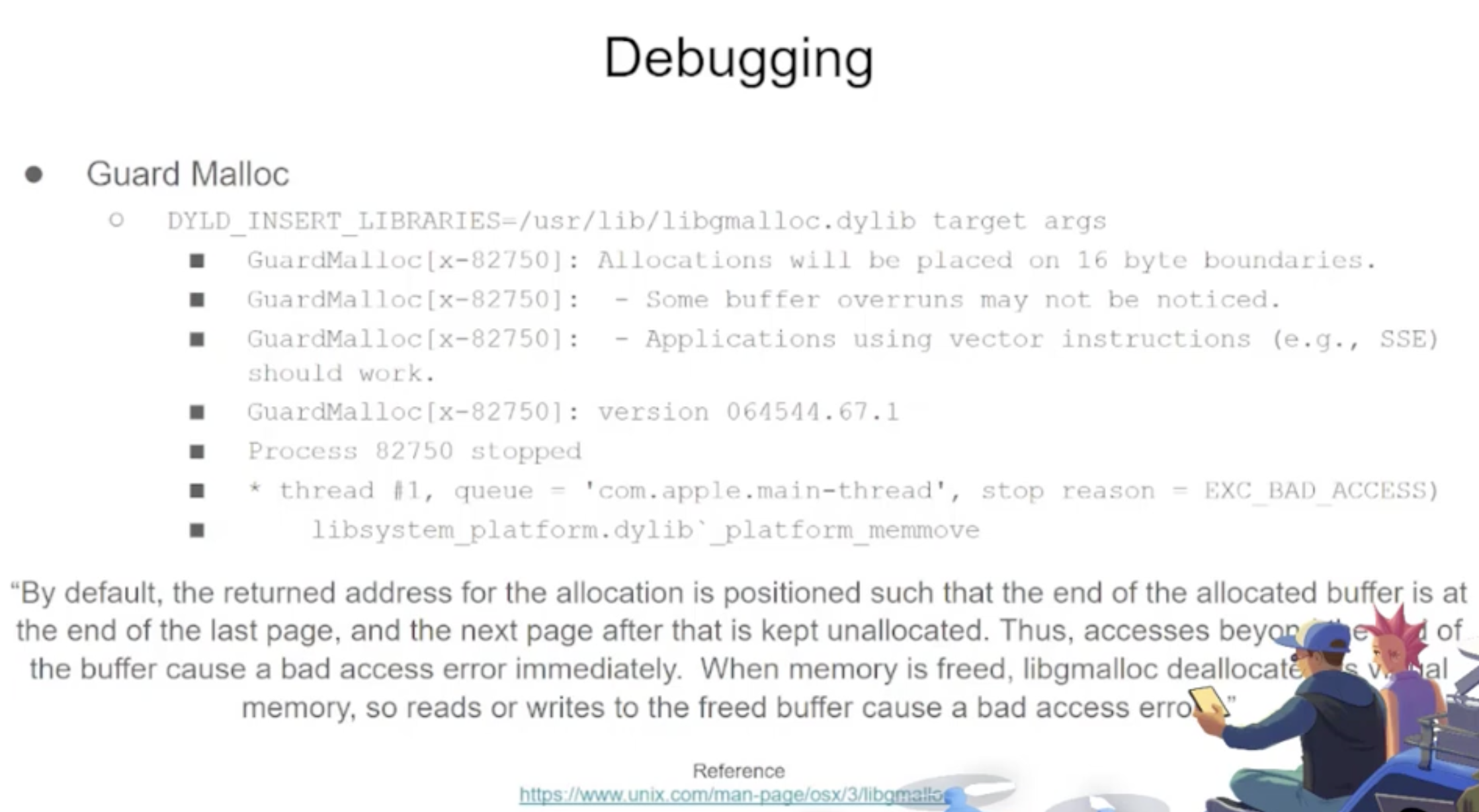
### Libgmalloc

<figure><img src="https://615200056-files.gitbook.io/~/files/v0/b/gitbook-x-prod.appspot.com/o/spaces%2F1DLBZdNLkY4FUHtMnjPr%2Fuploads%2Fgit-blob-8443160fd37bcdbad6cd52e0e4cbb85f270a80ba%2FPasted%20Graphic%2014.png?alt=media" alt=""><figcaption></figcaption></figure>

{% code overflow="wrap" %}

```
```

{% endcode %}

```bash
lldb -o "target create `which some-binary`" -o "settings set target.env-vars DYLD_INSERT_LIBRARIES=/usr/lib/libgmalloc.dylib" -o "run arg1 arg2" -o "bt" -o "reg read" -o "dis -s \$pc-32 -c 24 -m -F intel" -o "quit"
```

### Fuzzers

#### [AFL++](https://github.com/AFLplusplus/AFLplusplus)

适用于 CLI 工具

#### [Litefuzz](https://github.com/sec-tools/litefuzz)

它可以与 macOS GUI 工具一起使用。请注意，一些 macOS 应用程序具有特定要求，如唯一文件名、正确的扩展名，需要从沙盒中读取文件 (`~/Library/Containers/com.apple.Safari/Data`)...

一些示例：

{% code overflow="wrap" %}

```bash
# iBooks
litefuzz -l -c "/System/Applications/Books.app/Contents/MacOS/Books FUZZ" -i files/epub -o crashes/ibooks -t /Users/test/Library/Containers/com.apple.iBooksX/Data/tmp -x 10 -n 100000 -ez

# -l : Local
# -c : cmdline with FUZZ word (if not stdin is used)
# -i : input directory or file
# -o : Dir to output crashes
# -t : Dir to output runtime fuzzing artifacts
# -x : Tmeout for the run (default is 1)
# -n : Num of fuzzing iterations (default is 1)
# -e : enable second round fuzzing where any crashes found are reused as inputs
# -z : enable malloc debug helpers

# Font Book
litefuzz -l -c "/System/Applications/Font Book.app/Contents/MacOS/Font Book FUZZ" -i input/fonts -o crashes/font-book -x 2 -n 500000 -ez

# smbutil (using pcap capture)
litefuzz -lk -c "smbutil view smb://localhost:4455" -a tcp://localhost:4455 -i input/mac-smb-resp -p -n 100000 -z

# screensharingd (using pcap capture)
litefuzz -s -a tcp://localhost:5900 -i input/screenshared-session --reportcrash screensharingd -p -n 100000
```

{% endcode %}

### 更多关于 MacOS 的模糊测试信息

* <https://www.youtube.com/watch?v=T5xfL9tEg44>
* <https://github.com/bnagy/slides/blob/master/OSXScale.pdf>
* <https://github.com/bnagy/francis/tree/master/exploitaben>
* <https://github.com/ant4g0nist/crashwrangler>

## 参考资料

* [**OS X Incident Response: Scripting and Analysis**](https://www.amazon.com/OS-Incident-Response-Scripting-Analysis-ebook/dp/B01FHOHHVS)
* [**https://www.youtube.com/watch?v=T5xfL9tEg44**](https://www.youtube.com/watch?v=T5xfL9tEg44)
* [**https://taomm.org/vol1/analysis.html**](https://taomm.org/vol1/analysis.html)
* [**The Art of Mac Malware: The Guide to Analyzing Malicious Software**](https://taomm.org/)

### [WhiteIntel](https://whiteintel.io)

<figure><img src="https://615200056-files.gitbook.io/~/files/v0/b/gitbook-x-prod.appspot.com/o/spaces%2F1DLBZdNLkY4FUHtMnjPr%2Fuploads%2Fgit-blob-878e43bb9c156ea00e2843c8fc47e5e4ebfbc581%2Fimage%20(1224).png?alt=media" alt=""><figcaption></figcaption></figure>

[**WhiteIntel**](https://whiteintel.io) 是一个由**暗网**支持的搜索引擎，提供免费功能，用于检查公司或其客户是否受到**窃取恶意软件**的**侵害**。

WhiteIntel 的主要目标是打击由信息窃取恶意软件导致的账户劫持和勒索软件攻击。

您可以访问他们的网站并免费尝试他们的引擎：

{% embed url="<https://whiteintel.io>" %}

<details>

<summary><strong>从零开始学习 AWS 黑客技术，成为专家</strong> <a href="https://training.hacktricks.xyz/courses/arte"><strong>htARTE（HackTricks AWS 红队专家）</strong></a><strong>！</strong></summary>

支持 HackTricks 的其他方式：

* 如果您想在 HackTricks 中看到您的**公司广告**或**下载 PDF 版本的 HackTricks**，请查看[**订阅计划**](https://github.com/sponsors/carlospolop)!
* 获取[**官方 PEASS & HackTricks 商品**](https://peass.creator-spring.com)
* 探索[**PEASS 家族**](https://opensea.io/collection/the-peass-family)，我们的独家[**NFT**](https://opensea.io/collection/the-peass-family)收藏品
* **加入** 💬 [**Discord 群组**](https://discord.gg/hRep4RUj7f) 或 [**电报群组**](https://t.me/peass) 或在 **Twitter** 🐦 [**@carlospolopm**](https://twitter.com/hacktricks_live)\*\* 上关注我们。\*\*
* 通过向 [**HackTricks**](https://github.com/carlospolop/hacktricks) 和 [**HackTricks Cloud**](https://github.com/carlospolop/hacktricks-cloud) github 仓库提交 PR 来分享您的黑客技巧。

</details>